As an Amazon Associate this site earns from qualifying purchases.
Top Picks
Step 3: Handle Obstacles Like a Pro
Trees, garden beds, ponds, and decorative rocks all need their own little wire loops — called island boundaries. The trick is that the wire travels OUT to the obstacle, loops AROUND it, and travels back along the same path. Those two parallel wires cancel each other out, so the mower crosses them without flinching.
Distance Guidelines for Common Obstacles
| Obstacle | Wire Distance | Why |
|---|---|---|
| Tree trunk | 12 inches | Protects bark and roots |
| Flower bed edge | 12 inches | Prevents stem damage |
| Pond or water feature | 24 inches | Safety buffer for slopes |
| Patio or driveway | 4 inches | Allows clean edge cuts |
| Fence (solid) | 10 inches | Prevents deck contact |
Reviewed by the Mowveo Editorial Team
Finding the right how to install robot lawn mower comes down to matching the features to how you will actually use it.
Last Updated: June 2026 — Written by the Mowveo Editorial Team
"My first install took six hours. My second took ninety minutes. The difference wasn't a better mower — it was knowing where the time-sinks actually were."
— Mowveo Editorial Team
If you're staring at a sealed robot mower box in your garage right now, wondering what on earth you've gotten yourself into — take a breath. You're not in over your head. You just haven't been told which corners to cut and which ones will quietly haunt you for the next three summers.
This guide walks you through how to install a robot lawn mower the way I genuinely wish someone had walked me through it: with the boring prep work front-loaded so the satisfying part — that magical moment when the little machine glides off its dock for the very first time — actually happens on day one, not day three.
The 60-Second Answer: How to Install a Robot Lawn Mower
The Quick Version
Installing a robot lawn mower involves five core steps: choose a charging station location with power and signal access, lay the boundary wire around your lawn perimeter and any obstacles, connect the wire ends to the base station, pair the mower to the dock and your app, then run a manual perimeter test before scheduling autonomous mowing.
For a quarter-acre lawn, plan on three to four hours of focused work — and most of that time is wire placement, not anything remotely technical. If you can hang Christmas lights, you can install a robot mower.
The good news for 2026: Newer GPS- and RTK-based models skip the boundary wire entirely, slicing install time roughly in half. But even if you're working with a traditional wired model, the playbook below gets you to a fully autonomous lawn before sundown.
Watch It Done: Robot Mower Installation in Real Time
A complete walkthrough showing every step of a real backyard install — pause it as you go.
Before You Cut Anything: The 20-Minute Prep That Saves Hours
Here's the truth nobody puts on the box: the install starts before you ever pick up a tool. The homeowners who breeze through setup all do the same boring thing first. They walk the lawn.
Pro Tip From the Trenches
Grab a paper sketch of your yard before you open the box. Mark every tree, flower bed, sprinkler head, patio edge, and slope. The five minutes you spend drawing will save you forty minutes of re-routing wire later.
Your Pre-Install Checklist
- [ ] Mow the entire lawn one last time with your old mower (short grass = clean wire placement)
- [ ] Clear sticks, stones, pet toys, and forgotten garden hoses
- [ ] Locate a weatherproof outlet within 30 feet of your planned dock site
- [ ] Confirm your Wi-Fi signal reaches the dock (test with your phone)
- [ ] Charge the mower battery indoors while you do the wiring
- [ ] Download the manufacturer app and create your account
Step 1: Choose the Perfect Charging Dock Location
The dock is the heart of the operation. Get this wrong, and your mower will spend its life pinballing back and forth trying to find home. Get it right, and you'll forget the machine exists — which is exactly the point.
Green Flags: Ideal Dock Spots
- Flat, level ground
- Partial shade (extends battery life)
- Near a grounded outlet
- At least 10 feet of straight wire approach
- Sheltered from heavy rain runoff
Red Flags: Avoid These Spots
- Slopes greater than 15 degrees
- Direct all-day sun exposure
- Low-lying areas that pool water
- Tight corners or narrow passages
- Spots where sprinklers spray the dock
Step 2: Lay the Boundary Wire (The Hour That Defines Everything)
This is the make-or-break step. The boundary wire tells your mower where its world begins and ends. Lay it casually, and you'll be re-pegging sections every windy weekend. Lay it with intention, and it disappears into the lawn within two weeks of growth.
The Golden Rule of Boundary Wire
Keep the wire 10 inches (25 cm) from solid obstacles like walls and fences, and 12 inches (30 cm) from flower beds you want to protect. Closer than that, and the mower's cutting deck will overhang into trouble.
The Three-Pass Wire Method
Pass One — Rough Route: Walk the perimeter loosely placing the wire. Don't peg anything yet. You're sketching, not committing.
Pass Two — Tension and Adjust: Pull the wire tight along your route, smoothing curves and shortening dramatic loops. This is where you spot the awkward bits.
Pass Three — Peg It Down: Drive a peg every 30 inches on straight runs and every 12 inches around curves. Push the peg flush so the mower wheels glide right over it.
Insider Trick
If you have a lawn edger, run a shallow groove along your wire route first, then press the wire into the groove. Within two mowings, it's invisible and bulletproof against squirrels, rakes, and aerator tines.
Step 4: Connect, Power Up, and Pair
The finish line is in sight. Strip the wire ends, secure them under the dock terminals (color-matched, almost always), and plug in the power supply. A steady green or blue LED on the dock means the signal loop is intact and you're ready to talk to the mower.
If the LED Blinks Red or Stays Off
99% of the time, the wire is broken somewhere along the route — usually right at a connector. Walk the line. Look for kinks, animal damage, or a loose pin. A $4 wire repair connector fixes almost every signal fault in under five minutes.
Now open the app, follow the in-app pairing wizard, and dock the mower for its first full charge. Most apps will walk you through a guided perimeter test next — let it run, don't skip it. This is where your wire layout proves itself.
See the Common Mistakes (So You Don't Make Them)
The mistakes that turn a 3-hour install into a 3-day install — and how to dodge every one.
Step 5: The First Run (Why Babysitting Day One Matters)
Resist the urge to walk away. The first mow is a diagnostic — not a labor-saver yet. Watch how the mower handles the trickiest corners. Listen for moments where it bumps the wire or hesitates. Make notes. Tomorrow's tweaks come from today's observations.
What a Healthy First Run Looks Like
- Smooth, confident turns at the boundary
- Returns to dock without bumping the entrance
- No alarms, error codes, or unexpected stops
- Even cutting pattern across open areas
- Handles your steepest slope without wheel spin
Wire-Free in 2026: The GPS and RTK Revolution
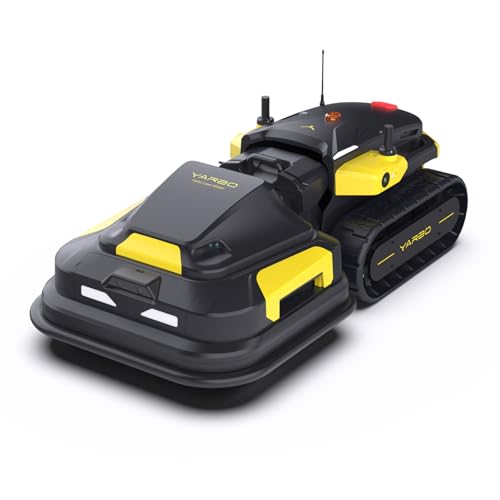
If you're shopping new (or your wired install sounds like a weekend you don't want), the latest wave of GPS- and RTK-guided robot mowers is genuinely the biggest leap this category has ever seen. You unbox, place a reference antenna, walk the perimeter once with your phone, and you're mowing.
Wired vs Wire-Free: Quick Comparison
| Factor | Wired Models | GPS/RTK Models |
|---|---|---|
| Install time | 3 to 6 hours | 30 to 60 minutes |
| Boundary changes | Re-lay wire | Edit in app |
| Reliability in trees | Excellent | Good (improving) |
| Upfront cost | Lower | Higher |
| Best for | Established yards | Renters, evolving landscapes |
Troubleshooting: The Five Problems Every New Owner Hits
Quick Diagnostic Guide
Mower won't leave dock: Wire loop is broken. Check the LED, walk the perimeter, look for cuts.
Stripes of uncut grass: Schedule isn't long enough or random pattern needs more passes. Increase mow frequency.
Mower stuck repeatedly: An obstacle is too close to the wire. Re-route that section with a 4 inch wider buffer.
App won't connect: Wi-Fi signal at the dock is weak. Add a mesh node or move the router.
Mower returns to dock but won't charge: Clean both the mower's contacts and the dock's strips with a soft cloth. Oxidation builds fast.
The Final Word: You're Closer Than You Think
Here's the part nobody warns you about: the first time you sip coffee on your porch and watch a tiny machine maintain your lawn while you do absolutely nothing — it's weirdly emotional. It's the closest most of us will ever get to having a tiny mechanical pet that earns its keep.
The install isn't easy because it's complicated. It's easy because every step has a right answer, and now you have all of them. Take it one section at a time, trust the prep work, and by this time tomorrow you'll be that person on the block with the suspiciously perfect lawn.
Ready to reclaim your weekends?
Bookmark this guide, walk your lawn, and start with Step 1. The hardest part is opening the box.
Key Takeaways
- Choosing the right how to install robot lawn mower means matching the key features to your specific needs and budget
- Read real customer reviews and check the return policy before you commit
- Also covers: robot mower setup
- Also covers: boundary wire installation
- Also covers: charging station placement
- Compare value across models — the priciest option is not always the best fit


